
Oracle Database Structure
The Preamble
I have a Computing degree from a University in the UK. The degree I studied was not the one I wanted to study. I was accepted onto other University courses, at other universities, but when it came down to the costs, some costs were a bit beyond the finances available to me and the more I researched the more I understood that staying at the parental home throughout most of my university time would make attending university a much more realistic goal.
By restricting my university choices to only those I could reliably commute to, I directly limited the courses available to me. My degree is in Computing & Information Systems. Which as it turns out, was very much a database heavy degree.
I never really wanted to study databases, I never found it to be an especially interesting part of computing. Here I am a couple of decades later and I’m having to call on that database knowledge to help me master WebCenter Portal.
Database Structures
I am not responsible for the database layer, in fact, I am not even allowed to touch the database layer in my role. However I am growing increasingly aware of just how important it is in this particular stack.
Some uderstanding of the Oracle Database architecture seems to help with understanding all of the other components.
Sure I can rely on the fact that the database analysts (DBA’s) are clever enough to make their part of the infrastructure work, but from a lab and testing point of view, revisiting and improving on previous knowledge is a real help.
An Instance of the Database
To my mind, you can imagine a database as being a product that is multi-tenant by design. By which it seems that the database software is a digital storage mechanism, a way to organise and store the data in a controlled way. An instance of the database is a collection of resources that are used by an application or other system(s). Therefore you install the database software once and then define groups of resources as required, these groups of resources are the instances.
I previously had a web-server that hosted a forum related to Linux, a place for people to ask and answer questions, post screenshots, a member directory, a way to score an answer so as to recognise valuable contributors etc. Behind the scenes, there was a MySQL database, the schema was something like LJBB_.
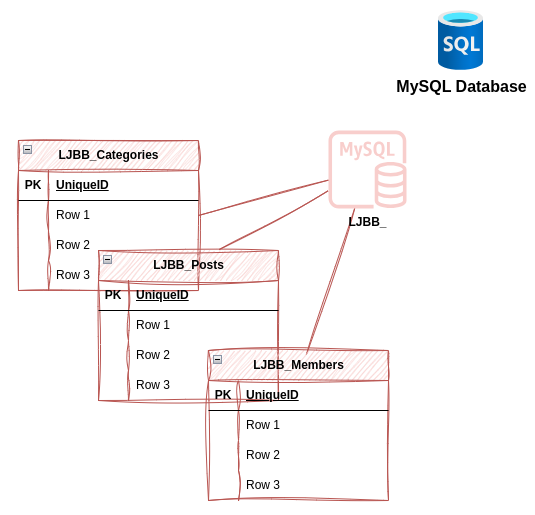
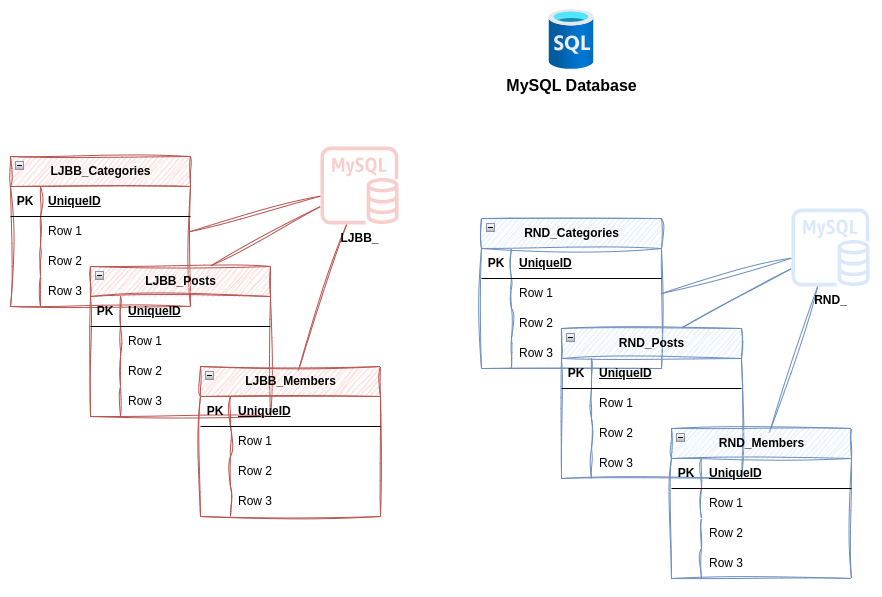
At some point down the road, I had to admit that I had over-spec’d the server and it wasn’t doing anywhere near as much as I’d expected it to, so I was basically paying for loads of idle resources. There was another database I had access to, so I backed it all up and then imported it into my existing database as a separate instance. It didn’t matter how similar or different the data was, they both ran completely independent of one another on the same machine and with no awareness of the other instances. This not only allowed me to better use my system resources, but also simplified my backup activities as then I only needed to backup a single server.
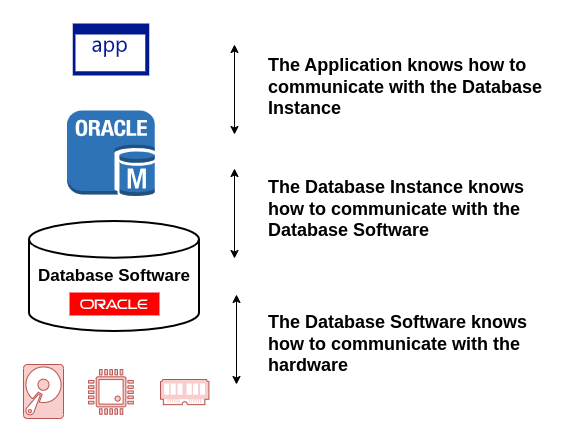
We like to look at things as ‘stacks’ in the technology world, therefore you could further consider the difference between a database and an instance as layers of abstraction:
The above image is only meant to show how an application communicates with the the database, the application may or may not know about the rest of the systems hardware, but we’re looking at this from the database viewpoint, and from that place, an application only needs to know how to talk to an instance, the instance is controlled by the database software and the database software needs to know about the hardware in order to optimise and to write the actual data to storage.
Schemas
I have inferred that an instance of the database is related to the schema, and to my mind, that is a basic unit of knowledge for this topic. However, the schema is more than the instance. The schema is used to logically differentiate tables in a database, in the Oracle world, this even comes down to allocating users and permissions. I don’t remember this in MySQL, but it may just be that I didn’t understand that part of it at the time.
In the Oracle world, you can define a schema owner and that user has the ability to grant other users access to the schema data.
Pluggable Database
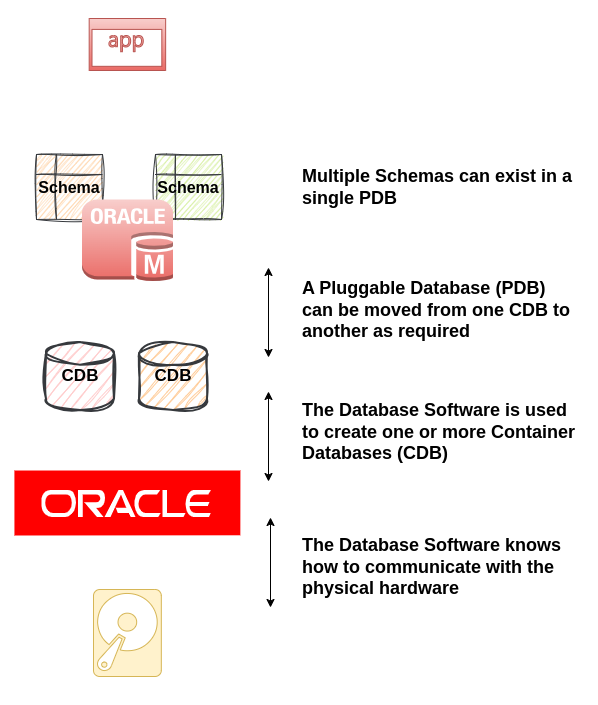
A pluggable database is another layer of abstraction, it would sit between the the database schema and the database instance.
That doesn’t exactly float well with my previous explantion of an instance as I described the schema as being the instance. Well, of course, there is more to it than that.
Each PDB instance can contain many schemas. And Each CDB can contain many PDBs.
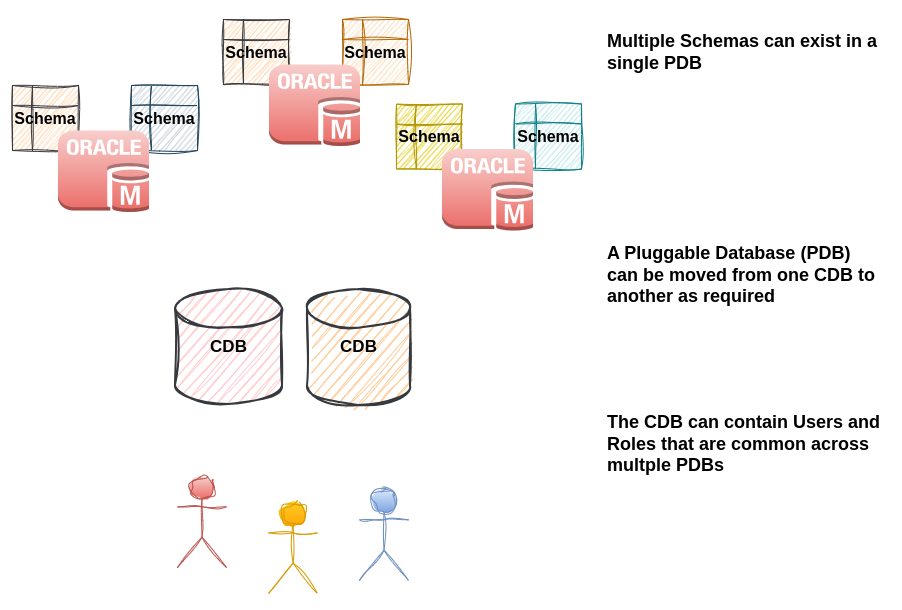
I think we can look at a PDB as being a Virtual Machine, or perhaps more like a containerised image and the CDB as being a Type 2 Hypervisor, with the Database software as being the Host Operating System.
I can upgrade the host operating system, largely without affecting my Type 2 Hypervisor (I can upgrade MacOS without affecting VirtualBox, for example.) The Virtual Machines inside Oracle VirtualBox shouldn’t really know that they are Virtual Machines at all and therefore they have no concern about me upgrading the host OS because they don’t really know it exists.
Oracle Database software knows how to access my machines hardware, it is the Operating system in this far fetched scenario. The Oracle Database software allows me to create Container Databases (CDBs) which are collections of resources, users, permissions etc. These CDBs are the Type 2 Hypervisor, something that doesn’t touch the metal (physical hardware). A Pluggable Database (PDB) is like the Virtual Machine, the Virtual Machine believes it is connected to the physical hardware, however, when trying to communicate with the hardware, it is instead communicating with the CDB.
One of the benefits of this level of abstraction is that different parts of the stack can be updated independantly, we can upgrade one of the CDBs and when it’s ready, we can shift the PDB(s) to the updated CDB and then start updating the other CDB etc.
Another benefit of these layers of abstraction is that you could clone your production PDB, build a test or development environment and then import the live production environment into the test environment as an example. This is especially useful when you want to test a large upgrade as you could clone the Production environment, move to a test bench, make the upgrade, do some tests and then when happy, you can raise a change to upgrade the production environment, presumably with some extra confidence in the outcome.
Control Files
One of the things I have needed to get on top of for the lab environment is the use of control files and to be frank, I’m not sure I have mastered this yet. From what I understand, these are initialisation files, they tell the database which instances to initialise, etc.
- INIT.ORA Instance Initialisation
- SPFILE Sever Parameter File
I definitely haven’t mastered my understanding of these files, I can admit that. It will likely be one of those things I look back at in a few years and think why didn’t I get that, it was so simple but today, it is another piece of the 3d puzzle that is clearly important but sometimes what I do works fine and other times it doesn’t work at all… Though I don’t know if it is necessarily the .ORA files that are letting me down or something else.